Clarnix help · Settings
Manage your Clarnix settings and briefing schedule
Your briefing schedule, your language and timezone, how the AI treats low-value mail, and how to delete your account.

Briefing schedule
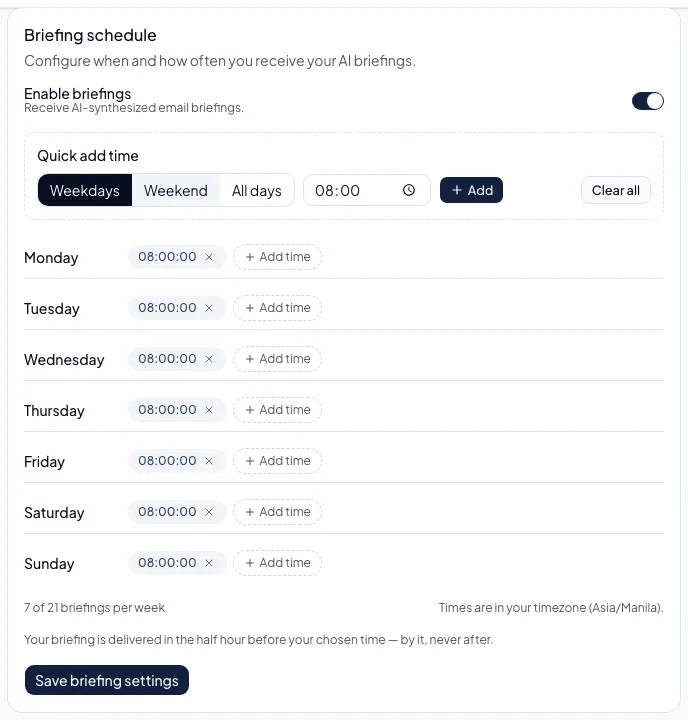
Choose daily, twice daily or weekly, and the times you want. You can add several times a day and set different times per weekday, or clear the lot and start again. Times run in the timezone stored on your profile, which is shown next to the schedule. If you have moved, change it there or briefings will keep firing on your old clock.
Detail level controls how much each briefing says: compact, normal or detailed.
AI triage and language
- AI triage can be switched off for the whole account, leaving only your own rules acting on incoming mail.
- The noise action decides what happens to low-value mail: archive it, apply a label you name, mark it read, or move it to the bin.
- Your preferred language sets the language of your briefings. It does not change the interface language you see when you are logged in.
- Context about your role and company helps the AI judge what matters. It is worth a sentence or two.
Signing out other devices
Sign out other devices ends every session except the one you are using. Worth doing if you have lost a laptop or phone, or after changing your password.
Deleting your account
Deleting is self-service and permanent. You confirm by typing DELETE and your current password. It removes your profile, your email accounts and their stored credentials, your classifications, briefings, channels, integrations, Email activity and rules.
Two things are kept on purpose: a record that the deletion happened, which retains your email address as the proof of it, and the accounting record of what you paid. Your user identity is stripped from the second, but Spanish accounting law requires the figures and payment references to be retained for several years.
| If you connected | What deletion does to our access |
|---|---|
| Gmail | We withdraw our access with Google as part of the deletion. It is a best-effort call that never blocks the deletion, so if you want certainty, check Google Account → Security → Third-party access afterwards. |
| Outlook | Microsoft gives us no way to withdraw access, so please remove Clarnix yourself from your Microsoft account permissions page. Our stored token is destroyed with your account and any live one expires within about an hour and a half. |
| iCloud or another IMAP account | The stored password is deleted, but the app-specific password itself stays valid at your provider until you revoke it there. |
There is no self-service data export yet. Email hello@clarnix.app and we will prepare one within the 30-day window the GDPR allows.